
Appearance
Integrating with External Services via Webhooks
FoxCLM has no built-in integration with Slack, HubSpot, Zapier, or any other specific service. What it has is a generic webhook feature: on any status change or scheduled interval, FoxCLM fires an HTTP request to a URL of your choice. The destination could be Slack's incoming webhook URL, Zapier's trigger URL, a custom API, or anything else that accepts HTTP.
This tutorial walks through configuring a webhook, using a Slack Incoming Webhook as a concrete example because it's the easiest target to set up. The same steps work for any destination - swap the URL and payload template.
Takes about 7 minutes.
Prerequisites:
- Any HTTP endpoint that accepts a POST. Common options:
- Slack - create an Incoming Webhook at https://api.slack.com/messaging/webhooks (sends to one channel)
- Zapier / Make / n8n - create a "Webhook" or "Catch Hook" trigger, copy the URL
- Custom API - your own server endpoint
- Access to Webhooks / API in FoxCLM (requires the Webhooks resource permission)
1. Open the Webhooks page
Click Webhooks in the sidebar (under AI TOOLS, or at Settings -> Webhooks / API).
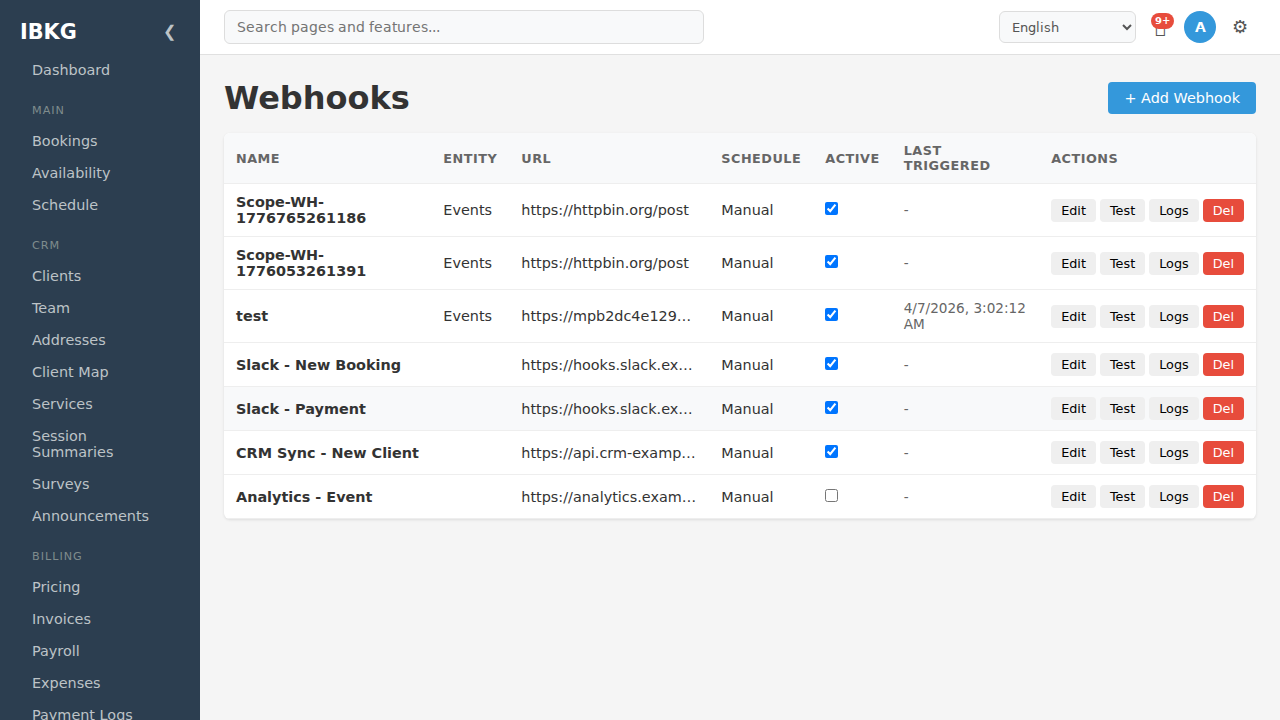
The Webhooks page lists every webhook config with:
- Name - your internal label
- Entity - which entity type it fires for (Events, Invoices, Clients, Payroll, or blank for workflow-triggered only)
- URL - destination (truncated)
- Schedule - Manual (fired by workflow action) or a cron expression (periodic)
- Active - toggle on / off
- Last Triggered - timestamp of the last delivery
- Actions - Edit / Test / Logs / Delete
The seeded examples include a few pointed at Slack Incoming Webhook URLs, a CRM sync target, and a generic analytics endpoint. They're all just the same webhook feature pointed at different URLs.
Click + Add Webhook.
2. Configure the webhook
The new webhook modal:
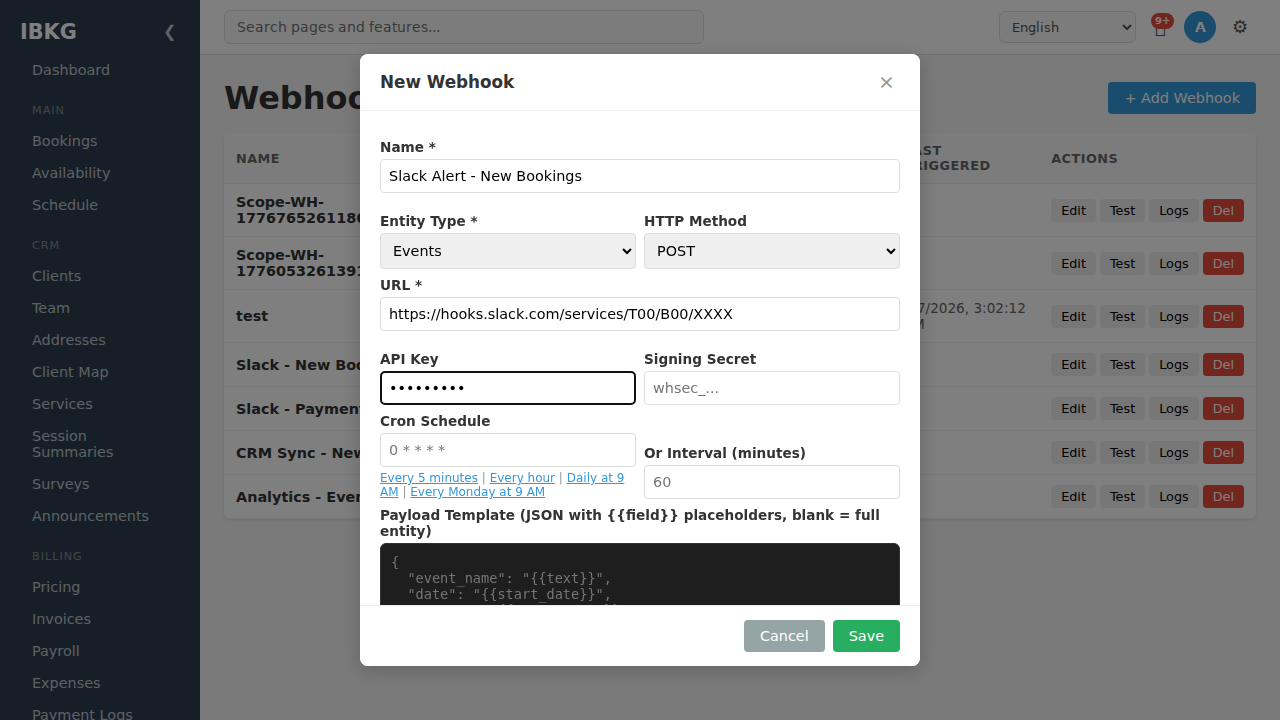
Basic fields
- Name (required) - internal label. Be descriptive: "Slack - New Bookings", "Zapier - New Payment", "CRM Sync - Clients"
- Entity Type (required) - which entity's events trigger this webhook:
Events,Invoices,Clients,Payroll, or leave as default if workflow-only - HTTP Method - POST (default), PUT, or PATCH
- URL (required) - the destination. For Slack: paste the Incoming Webhook URL. For Zapier: paste the Catch Hook URL. For a custom API: the full endpoint URL.
Authentication
- API Key (optional) - sent as the
X-API-Keyheader. Useful if the destination requires an auth header. - Signing Secret (optional) - FoxCLM signs each request with HMAC-SHA256 in the
X-FoxCLM-Signatureheader. The destination verifies by hashing the body with the same secret. Recommended for custom APIs.
For Slack and Zapier, leave both blank - they authenticate via the URL token itself.
Schedule (optional)
- Cron Schedule - fire the webhook on a schedule, independent of workflow transitions. E.g.
0 9 * * *for daily at 9am. - Or Interval (minutes) - alternative to cron: fire every N minutes.
Shortcuts below the input (Every 5 minutes, Every hour, Daily at 9 AM, Every Monday at 9 AM) fill in common schedules.
Leave both blank if you want the webhook to fire only when triggered by a workflow action.
3. Payload template
At the bottom of the modal:
Payload Template (JSON with placeholders, blank = full entity)This is the JSON body that gets sent. Leave it blank to send the full entity as JSON, or write a custom template with placeholders that are replaced with values at fire time.
Slack format
Slack expects a payload like:
json
{
  "text": "New booking from [guest_name] for [requested_start] - [requested_end]"
}
Or the richer Block Kit format. In the actual template, replace the square brackets with double curly braces around each field name - FoxCLM substitutes the values at fire time.
Zapier / Make / n8n
These tools accept any JSON - they map incoming fields to downstream steps. Just send the fields you care about. Or leave the template blank to send the full entity.
Custom API
Match whatever schema your API expects. Placeholders cover every field on the entity.
Workflow metadata
When fired by a workflow action, FoxCLM injects a _workflow block automatically:
json
{
  "_workflow": {
    "from_status": "pending",
    "to_status": "approved",
    "entity_type": "booking"
  }
}
Filter on this in the destination if you want to behave differently per transition.
Click Save when ready.
4. Fire the webhook from a workflow
Go to Workflow -> pick the right entity type -> click the transition where you want the webhook to fire.
In the transition editor:
- Click + Add Action
- Pick Call Webhook from the dropdown
- Select your saved webhook config
- Save the transition
Now, every time that transition fires, FoxCLM calls your webhook with the configured payload.
5. Test before going live
On the Webhooks list, click Test next to your config. FoxCLM fires the webhook with a sample payload and shows the response:
- 200-299: success - check the destination (Slack channel, Zapier run log, API server log) for the message
- 400+: error - check your URL, auth, and payload format
- Timeout: destination didn't respond in time
Fix any issues and re-test before relying on the webhook in a live workflow.
6. Monitor deliveries via Webhook Logs
Click Webhooks Logs in the sidebar (or Logs on any webhook row):
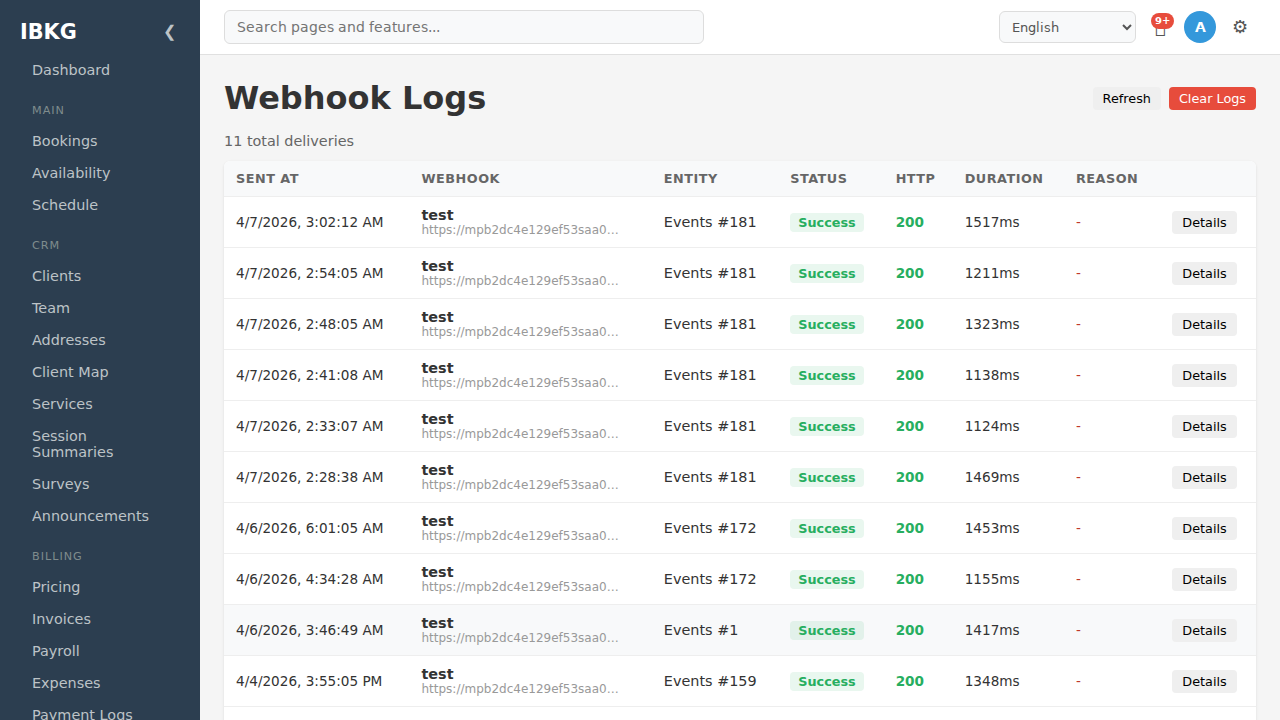
Every delivery is logged with:
- Sent at - timestamp
- Webhook - which config fired
- Entity - which entity triggered it (e.g. "Events #181")
- Status - Success / Failed
- HTTP - response code returned
- Duration - round-trip time in ms
- Reason - error message on failure
- Details - full request and response body
Click Details on any row to see the exact payload sent and the response received. Use this when debugging integrations that aren't working.
Failed deliveries retry up to 3 times with exponential backoff. After 3 failures, the log marks as failed and doesn't retry further - but the webhook config stays active for future triggers.
Common destinations and use cases
Slack
Create an Incoming Webhook at https://api.slack.com/messaging/webhooks, paste the URL, use Slack's block format for rich messages.
Good for: team alerts on new bookings, invoice payments, client churn.
Zapier / Make / n8n
Create a "Webhook" or "Catch Hook" trigger in the automation tool, copy the URL. The tool handles the downstream flow - Google Sheets, email blast, AI summarization, whatever.
Good for: integrations that need to touch many services, with logic that would be annoying to build in FoxCLM workflow actions alone.
CRM (HubSpot, Salesforce, Pipedrive)
Use the CRM's REST API. Set the URL to the relevant endpoint (e.g. https://api.hubapi.com/crm/v3/objects/contacts), add an API key in the API Key field, and match their schema in the payload template.
Good for: bi-directional CRM sync, marketing automation, sales pipeline.
Data warehouse
Point webhooks at a lightweight ingester (e.g. a Cloud Function) that writes to BigQuery, Snowflake, or Postgres. Leave the payload template blank to send the full entity.
Good for: real-time analytics, reporting, dashboards.
Your own API
Any URL works. Use signing secrets for production to verify requests came from FoxCLM.
Using the call_api action instead
For one-off HTTP calls where you don't need a saved config, use the call_api workflow action directly. It takes URL, method, headers, and body template inline. See Workflow Actions.
What's next
- Workflow Actions - full reference including
call_webhookandcall_api - Webhooks & API reference - including HMAC signing and retry logic
- Your First Workflow - build the transitions that fire webhooks