
Appearance
Contracts Overview
FoxCLM Contracts is a full Contract Lifecycle Management (CLM) system for service businesses that need to send, sign, and track agreements. Every contract flows through a configurable status workflow; external parties sign via a public link; obligations are tracked with due dates; amendments and renewals are first-class.
What it covers
- Contracts list - search, filter, and manage every contract
- Editor - 6 tabs per contract: Details, Parties, Obligations, Signatures, Amendments, History
- Designer - visual drag-and-drop layout for contract HTML
- Templates - reusable starting points with default obligation schedules
- Clause library - reusable paragraphs indexed by category and tags
- Obligations - cross-contract tracking of commitments and due dates
- Public e-signature - external parties sign at
/sign/<token>with typed or drawn signature - Amendments - linked child contracts for modifications
- Renewals - end-date-driven alerts and auto-renewal
Lifecycle statuses
| Status | Colour | Meaning | Editable |
|---|---|---|---|
Draft | gray | Being composed | Yes |
Under Review | yellow | Internal review | Yes |
Submitted for Approval | orange | Awaiting admin sign-off | Locked |
Approved | green | Ready to send for signature | Locked |
Rejected | red | Admin rejected; can revise | Locked |
Out for Signature | blue | Awaiting external signer | Locked |
Active | green | Fully signed and in effect | Locked |
Expiring Soon | orange | Within renewal-notice window | Locked |
Renewed | teal | Successfully renewed | Locked |
Amended | purple | Has amendments | Locked |
Terminated | dark gray | Ended early | Locked |
Expired | light gray | Past end date without renewal | Locked |
Editing-locked statuses can be reverted with Revert to Draft, which unlocks the editor.
The Contracts page
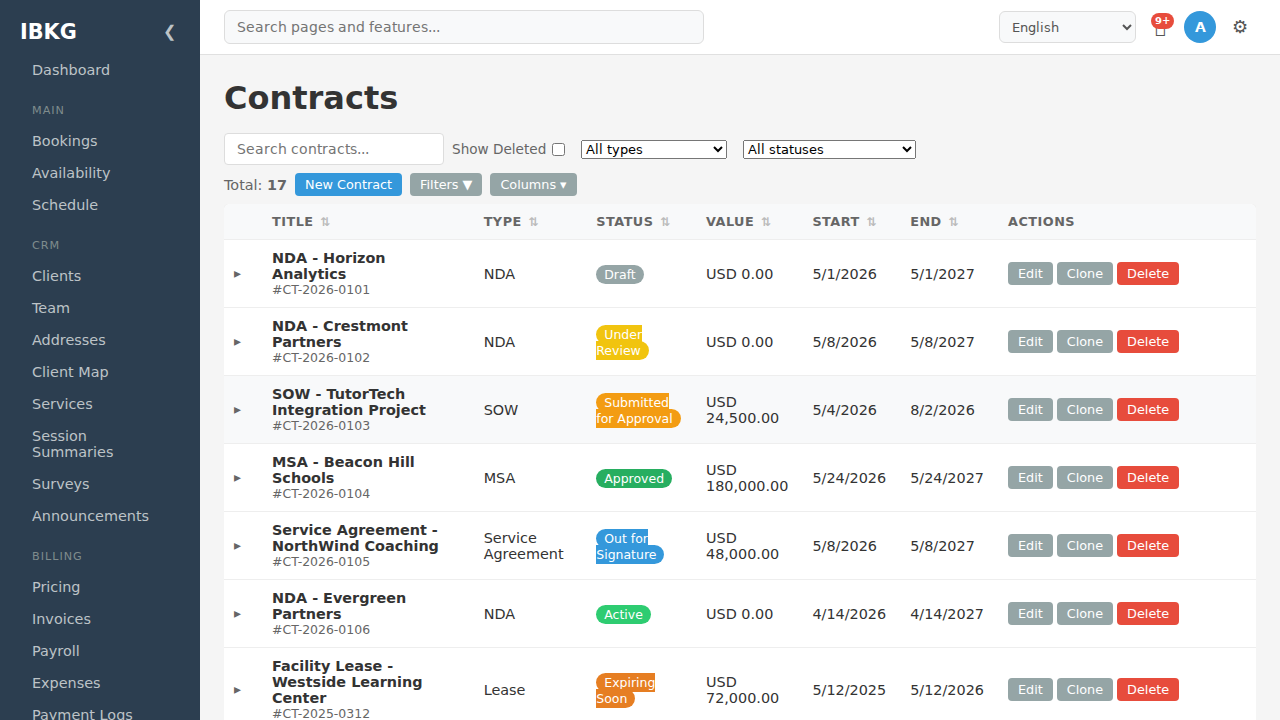
Every row shows title, contract number (e.g. CT-2026-0105), type, current status badge, value, start/end dates, and per-row actions (Edit / Clone / Delete). Filter by type and status via the dropdowns, or search by title.
Top toolbar:
- Search contracts - title, number, summary
- Show Deleted - reveal soft-deleted contracts
- All types / All statuses - quick filters
- New Contract - open the creation modal
- Filters / Columns - advanced narrowing and column toggles
Next steps
- Creating Contracts - step-by-step creation
- Templates & Clauses - build reusable assets
- Signatures - the public signing flow
- Audit Trail & Tamper Detection - the three integrity proofs behind every signed contract
- Obligations - track commitments
- Amendments & Renewals - handle changes over time