
Appearance
Contract Obligations
Obligations are trackable commitments tied to a contract. Examples:
- "Submit certificate of insurance" due 14 days after start
- "Deliver first milestone" due 30 days after start
- "Quarterly review" repeating every 90 days
- "Notify at least 30 days before renewal"
FoxCLM stores them with a title, description, due date, status, and source (manual / template / amendment).
Viewing obligations
Per-contract (Obligations tab)
Open any contract and click the Obligations tab. You see obligations specific to that contract, with:
- Title and description
- Due date
- Status (Pending / In Progress / Completed / Overdue / Waived)
- Source (manual / template / amendment)
- Actions - Complete / change status / Delete
Cross-contract (Contract Obligations page)
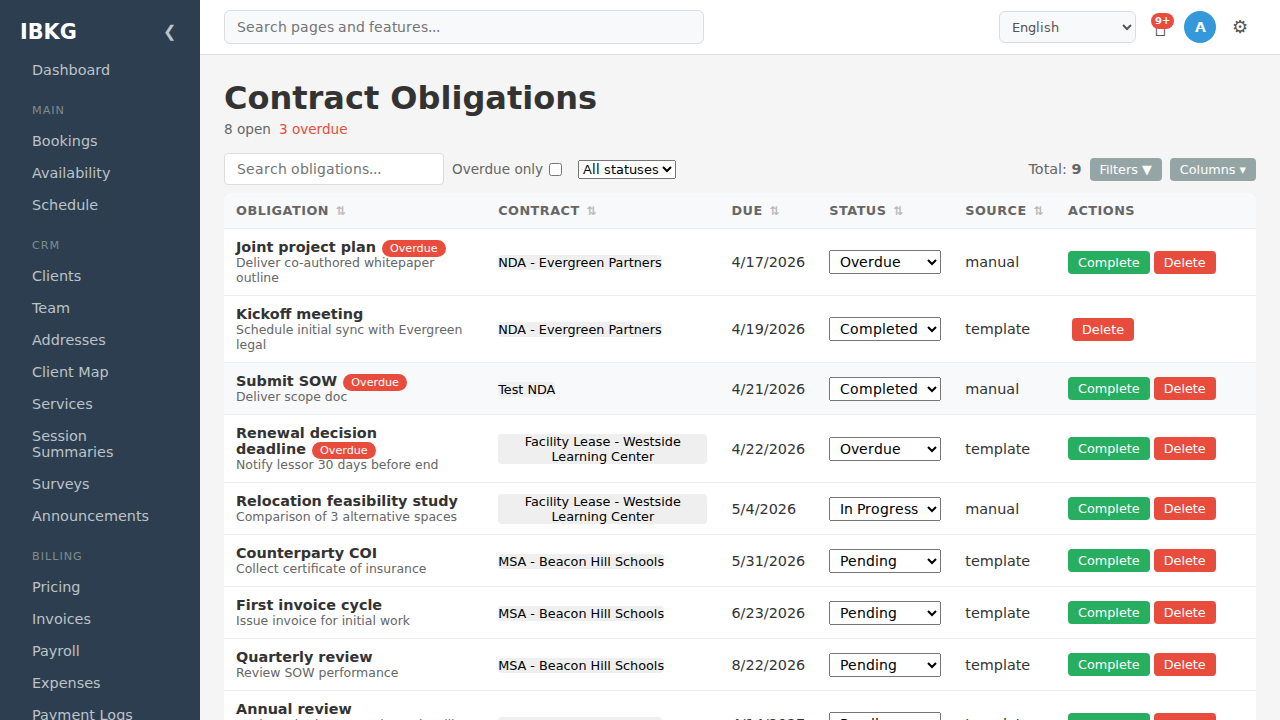
Navigate to Contract Obligations in the sidebar for a workspace-wide view.
Top stats: total open count and overdue count (in red).
Table columns:
| Column | Meaning |
|---|---|
| Obligation | Title + description, with red Overdue badge if past due |
| Contract | Which contract it belongs to |
| Due | Due date |
| Status | Dropdown to change status inline |
| Source | manual / template / amendment |
| Actions | Complete / Delete |
Filters:
- Search obligations - title, description, contract name
- Overdue only - hide everything but overdue
- All statuses - filter by specific status
How obligations get created
Manual
On any contract's Obligations tab, click Add Obligation:
- Title (required)
- Description
- Due date
- Assigned to (optional) - staff member
Use for one-off items specific to this contract.
Template-generated
When a contract transitions to Active and the contract was created from a template that has a default_obligation_schedule_json array, FoxCLM auto-generates one obligation per schedule entry:
- Title = schedule entry's
label - Description = schedule entry's
description - Due date =
contract.start_date + days_from_start - Source =
template
This is idempotent - if the contract re-enters Active (e.g. after a revert-to-draft and re-approval cycle), obligations don't duplicate.
See Templates & Clauses for schedule syntax.
Amendment-generated
When you amend a contract, the amendment is a new child contract. Obligations on the parent remain; you can add obligations to the amendment that only apply to the modified terms.
Lifecycle
An obligation moves through statuses:
Pending -> In Progress -> Completed
                       -> Waived (cancelled, don't count)
                       -> Overdue (auto-flag when past due without completion)
Pending is the default. Overdue is a derived flag based on due_date < today AND status NOT IN (Completed, Waived).
Click the status dropdown on any row to change it inline. Click the Complete button as a shortcut to move directly to Completed with today's date as the completed_at.
Automation setting
Settings -> Automation -> Auto-generate obligations (default: on)
When on, contracts auto-generate obligations from their template's schedule on Active transition. Turn off if you want to manage obligations manually regardless of template.
Workflow actions
send_obligation_reminder- config:days_before(e.g. 7). Emails the assigned user before the due date.- Configure on any transition, not just contract transitions - e.g. a scheduled daily cron transition can fire reminders.
Tips
- Assign obligations wherever possible - an unassigned obligation is everyone's responsibility, which usually means no one's.
- Use the template schedule for repetitive obligations that apply to every contract of a given type. Don't manually re-add "quarterly review" on every contract.
- Workspace-wide view is your dashboard for compliance - check the
Overdue onlyfilter weekly. - Mark Waived, not Completed, when an obligation no longer applies. Waived preserves the record without polluting completion reports.
Next steps
- Templates & Clauses - set default obligation schedules
- Amendments & Renewals - handle contract changes