
Appearance
E-Signatures
FoxCLM has a built-in public e-signature flow. No external service required. When a contract reaches Approved, click Send for Signature - FoxCLM generates a share token, emails every party with requires_signature: true, and opens the public signing page at https://<viewer-host>/sign/<token>.
Configuring parties
Before sending for signature, make sure each party who needs to sign is set up correctly in the Parties tab:
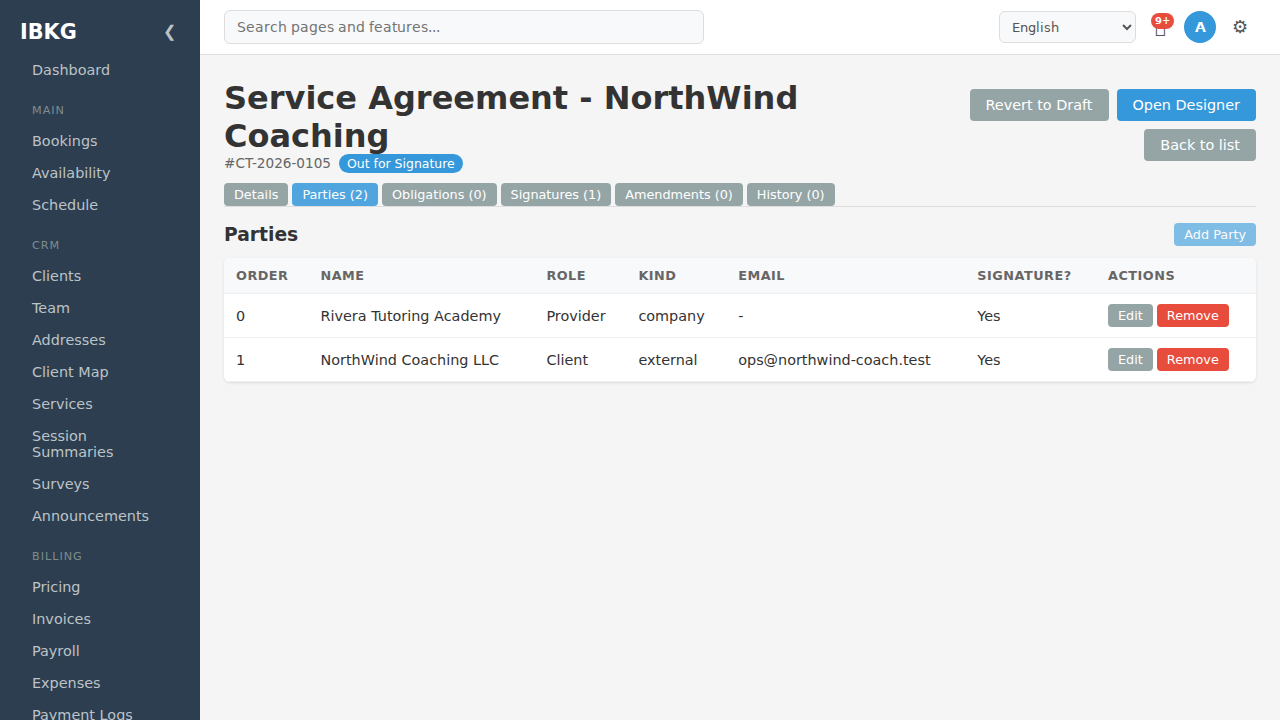
For each signing party:
- Display name - exact legal name preferred
- Kind -
client,company,staff, orexternal - External email - required if kind is
external - Signing order - lower values first on the signing page
- Requires signature - must be on for the party to appear on the signing page
Parties without requires_signature are informational only (witnesses, observers).
The Send for Signature action
From any Approved contract, the Send for Signature button does four things:
Creates a
sharesrow withtype='contract'and a UUID token.Moves the contract to
Out for Signature(editing locks).Fires the
share_contractworkflow action if configured.Emails each signing party a link:
https://<viewer-host>/sign/<token>?party=<party_id>
Each email is pre-scoped to that party via the party query parameter so they can't accidentally sign as the other counterparty.
The public signing page
When a signer opens their link:
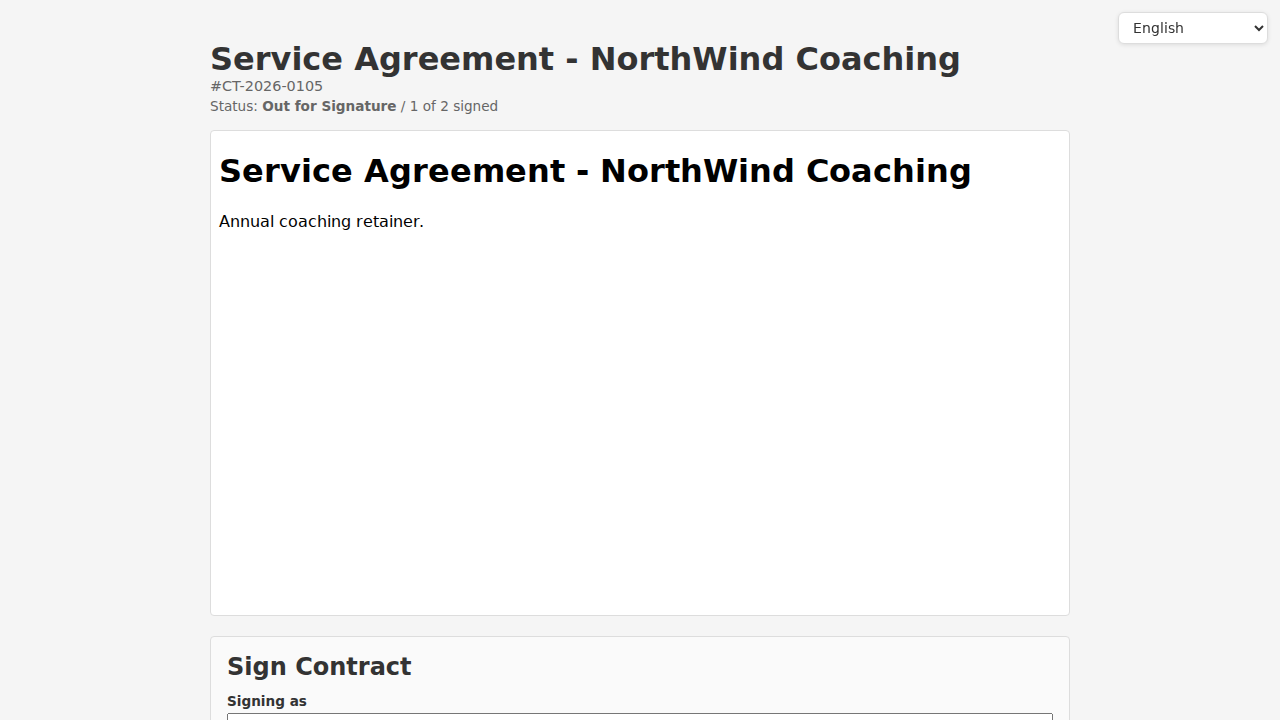
The top area shows:
- Contract title and number
- Status (
Out for Signature) - Signed count (e.g. "1 of 2 signed")
- Language selector
The contract body renders below using the designer's layout.
Scrolling down reveals the signing form:
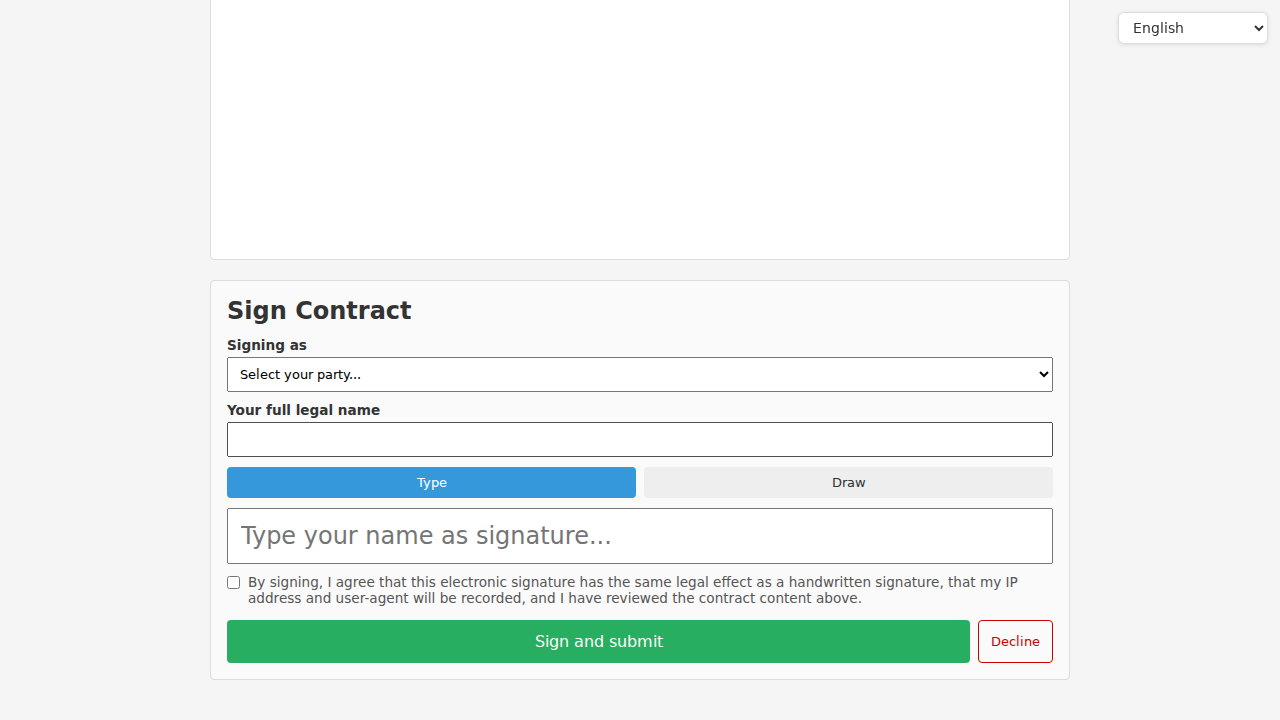
Fields:
- Signing as dropdown - auto-selected if the URL includes
?party=, otherwise the signer picks their party - Your full legal name - text input, must match their legal name
- Type / Draw toggle:
- Type - name is typed; signature is stored as text + rendered in a script font
- Draw - canvas pad; the signer draws with mouse or touch; stored as base64 PNG
- Agreement checkbox - "By signing, I agree that this electronic signature has the same legal effect as a handwritten signature, that my IP address and user-agent will be recorded, and I have reviewed the contract content above."
- Sign and submit - green button; disabled until name is filled and checkbox is ticked
- Decline - red button; opens a prompt for optional reason
What happens on sign
When Sign and submit is clicked, FoxCLM:
- Creates a
contract_signaturesrow with:- Party reference, signer name, signature type (typed / drawn), signature data
signed_attimestamp (UTC)- Signer's IP address and user-agent (audit trail)
- Share token used
- Increments the share's
view_count - Checks if all parties with
requires_signaturehave signed - If yes, sets the contract's
signed_atand fires anysigned_at is_not_nullworkflow condition (typically auto-transitions toActive) - Reloads the public page showing "Signed!" and the updated signed count
What happens on decline
When Decline is clicked:
- A prompt asks for an optional reason
- No signature is stored
- The signer's decline is logged (audit trail)
- The contract stays in
Out for Signatureso you can send to a different party or revise
Workflow actions for declines are not auto-fired; you can manually revert to Draft or reassign.
Revoking a signing link
If you need to cancel, open the contract and click Unshare (or fire the unshare_contract workflow action on a status transition). The existing link 404s.
Then click Send for Signature again to generate a new link.
Audit and legal considerations
Every signature captures:
- Signer's IP address
- Signer's user-agent
- Exact contract content at signing time (stored in the signatures table, not re-rendered)
- Timestamp in UTC
On top of that, FoxCLM maintains three independent integrity proofs covering the document, the workflow rules in force at each event, and the log of events itself. See Audit Trail & Tamper Detection for what each layer protects and what it doesn't. Consult your legal counsel on regional requirements (US ESIGN Act, EU eIDAS, HK ETO, etc.).
Workflow actions for signing
Common action setup:
| Transition | Action |
|---|---|
Approved -> Out for Signature | share_contract (creates the share token, emails signing links) |
Out for Signature -> Active (auto, condition signed_at is_not_null) | send_contract_approved_email (confirms to all parties the contract is executed) |
Any -> Terminated | unshare_contract (invalidate any lingering signing links) |
Next steps
- Creating Contracts - set up parties before sending
- Obligations - what happens after signing