
Appearance
Signing Verification
Signing verification controls how FoxCLM proves the person clicking Sign is who they claim to be. It has three layers, all configured per transition on the Require Signing Verification action in your contract workflow (not in Settings) - so each contract type enforces exactly what its lifecycle needs.
A contract whose workflow has no Require Signing Verification action on its signing transition is signed without any verification. Add the action to the transition that moves a contract to Out for Signature.
You configure it per transition in Workflow - open the transition (e.g. Approved -> Out for Signature) and edit its Require Signing Verification action:
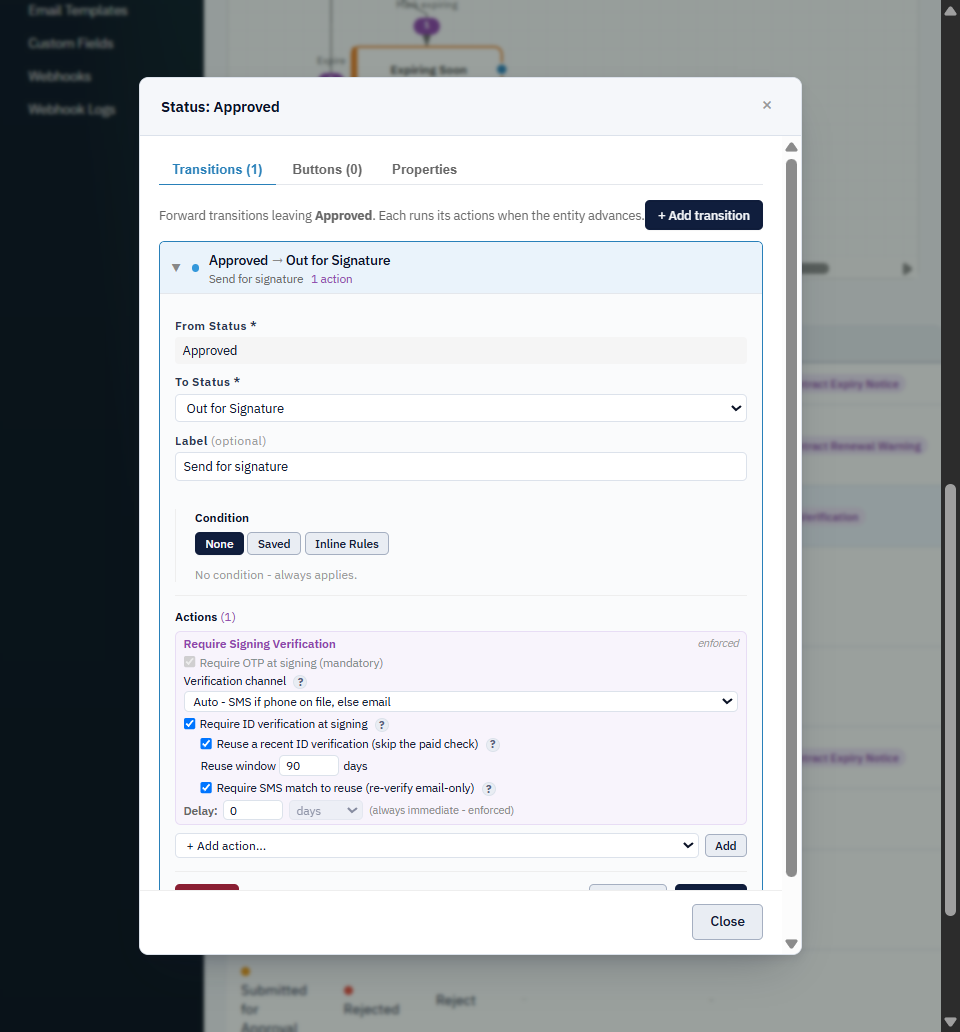
One-time code (OTP)
A one-time code is always required when the action runs - it's the baseline live proof that the signer controls the contact the link was sent to. The code expires after a few minutes.
Channel
Which channel the code is sent on:
- Auto - SMS if the signing party has a phone on file, otherwise email.
- Email only - always email.
- SMS only - always SMS (the party must have a phone).
SMS is the stronger possession factor: it reaches the signer on a channel separate from the emailed signing link, so an attacker who only has the link can't complete signing. But each SMS is billed (see Verification Usage in Settings). Email codes are free but share the same channel as the link.
Neither SMS nor email proves identity - only that someone controls that phone or inbox right now. For identity, add ID verification.
Authenticator app (TOTP)
For returning signers you can replace the SMS/email code with an authenticator app (Google Authenticator, Microsoft Authenticator, Authy, 1Password - any RFC-6238 app). Enable it on the action with "Let returning signers use an authenticator app instead of a code."
How it behaves:
- First signing - the signer gets a sent code (SMS/email) as usual, and can optionally set up an authenticator: they scan a QR (or enter the secret) once. Nothing is sent to a phone number.
- Later signings - if that same identity is enrolled, FoxCLM asks for the 6-digit code from their authenticator app instead of sending a code. No SMS cost, no inbox dependency.
What it proves: possession of the secret on the signer's device - not control of a phone number or inbox. Because the code is computed offline from the secret, there's nothing to intercept, and a reassigned phone number doesn't grant access. It's a continuity factor: it shows the returning signer is the same party/device that enrolled - strongest when the first signing also ran ID verification.
The enrollment is keyed to the signer's identity (a known client by ref_id, or their email/phone) and reused across that workspace's contracts, the same way IDV reuse is matched.
ID verification (Shufti)
When enabled, each party must pass a Shufti Pro identity check - a government ID scan plus a face match - before they can sign. It stacks on top of the OTP: both must clear.
ID verification is a paid service, billed per attempt (max 3 attempts per party). Track spend under ID Verification Usage in Settings. Turn it on for material or high-risk contracts, not routine ones.
What you're billed for
Two of the three layers can incur charges; the app tracks actual spend so there are no surprises:
| Layer | Cost | Where to track |
|---|---|---|
| Email OTP | Free | Settings > Verification Usage |
| SMS OTP | Billed per message (per segment, varies by destination country) | Settings > Verification Usage |
| ID verification (Shufti) | Billed per attempt (up to 3 per party) | Settings > ID Verification Usage |
Both usage pages show a per-item log plus a running total for any date range. Ways to control cost:
- Use the Auto or Email only channel for routine contracts - email OTP is free; reserve SMS for higher-assurance signings.
- Turn on reuse so a returning signer doesn't trigger (and pay for) a fresh ID check within the window.
- Only enable ID verification on material or high-risk contracts.
Force fresh verification (high-risk)
For a high-risk transition you can require full re-verification with no continuity shortcuts. When Force fresh verification is on, the contract:
- ignores any enrolled authenticator - every signer (even a returning one) gets a freshly sent SMS/email code; and
- ignores IDV reuse - a returning signer must pass a fresh Shufti check, not a reused one.
Use it on transitions where the stakes justify re-proving identity every time (large value, sensitive amendments). It's the deliberate, per-transition counterpart to the lost/locked-device recovery, which also forces a fresh re-verification.
Reusing a recent ID check
A returning signer who already passed an ID check recently can reuse it instead of paying for a fresh one. When reuse is on, FoxCLM looks for an accepted ID check by the same identity within the reuse window; if found, it satisfies the ID-verification gate at zero cost.
Important - a code proves possession, not identity. Reuse skips the document and face check, so the only live proof at signing becomes the one-time code. A code only proves someone controls that phone or email right now - not that they're the same person who passed the original ID check. Phone numbers get reassigned, inboxes get shared, SIMs get swapped.
Guardrails that keep reuse honest:
- Reuse only applies when an OTP is also required (it always is on this action).
- Reuse never overrides a fresh decline on the same contract.
- The reuse window is bounded; 90-180 days is typical for identity reuse. The longer you trust an old check, the more an identity can drift.
Use reuse for routine, repeat counterparties. For high-value or high-risk contracts, leave it off so every signing runs a fresh ID check.
Require an SMS match to reuse
When reuse is on, this controls what counts as "the same identity":
- On (recommended) - reuse only when the returning signer matches the prior check on the same phone, and the code is sent by SMS. If they match only by email, FoxCLM charges a fresh ID check instead of trusting an email code.
- Off - an email match is enough to reuse, and the code may be sent by email.
An email code is a weaker possession proof than SMS (shared inboxes, forwarding rules), which is why matching on a phone is the safer default for skipping a paid identity check.